CIGOCIGO beginner guide

One phone · one paper wallet · one safe path

Import and verify a paper wallet.

First check the public address without touching the secret. Then import the private key into Rabby in complete privacy. Complete one small step at a time.

Stop before photographing or recording the secret. Never photograph, scan into a website, email, upload, or send the private key or recovery words. Anyone who obtains either can control the wallet. COSIGO will never ask for them.
Use only an authorized walletImport only a paper wallet you own or have been explicitly authorized to control.
Assume copies may existIf another person created or printed the paper wallet, they may still have its private key. After importing, move the assets to a fresh wallet you created yourself.

Quick instructions

The whole process in seven steps.

Read this list once. The real pictures and detailed instructions follow underneath.

  1. 1Find the public addressUse only the section marked Address. It is safe to share.
  2. 2Check it on BscScanBscScan is a public record page. Confirm the BNB, USDT, and CIGO balances before importing.
  3. 3Open RabbyUse the official Rabby mobile app. Open the wallet list and press Add Wallet.
  4. 4Choose Private KeyPress Import Private Key. Do not select Seed Phrase for this type of paper wallet.
  5. 5Enter the secret privatelyCover cameras and people nearby. Type or scan the private key only inside Rabby. This guide intentionally shows no secret-entry picture.
  6. 6Compare the resultThe first and last characters of the imported address and the balances should match BscScan.
  7. 7Protect the fundsIf anyone else has ever seen the private key, move everything to a fresh wallet and permanently retire the paper wallet.

Before you begin

Know what is safe to show.

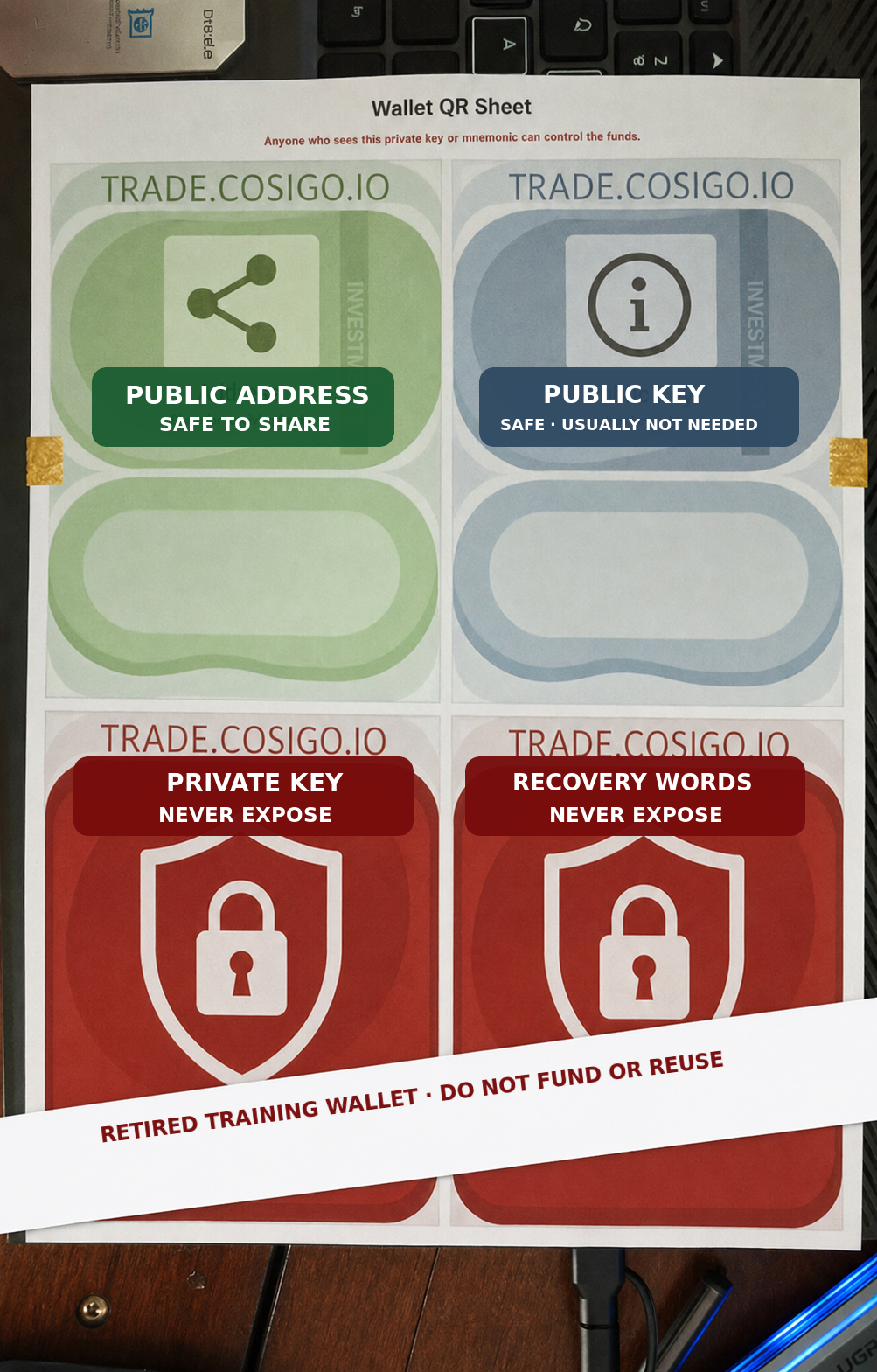
The training image below contains no working QR code, address, key, or recovery phrase.

1

Separate public information from secrets.

Public address: the receiving location. Share it when someone needs to send assets to you.

Public key: safe to reveal, but normally unnecessary for receiving.

Private key: the secret that controls this one address.

Recovery words: secret words that may control an entire wallet and many addresses.

Stop ifsomeone asks you to send a private QR, private key, recovery words, or Rabby password.

Sanitized training paper wallet showing which sections may be shared and which must never be exposed
Sanitized training image. Every original code and credential was removed.

Detailed instructions

Verify first. Import second.

Nothing in the first four steps controls or spends the wallet. They use only its public address.

2

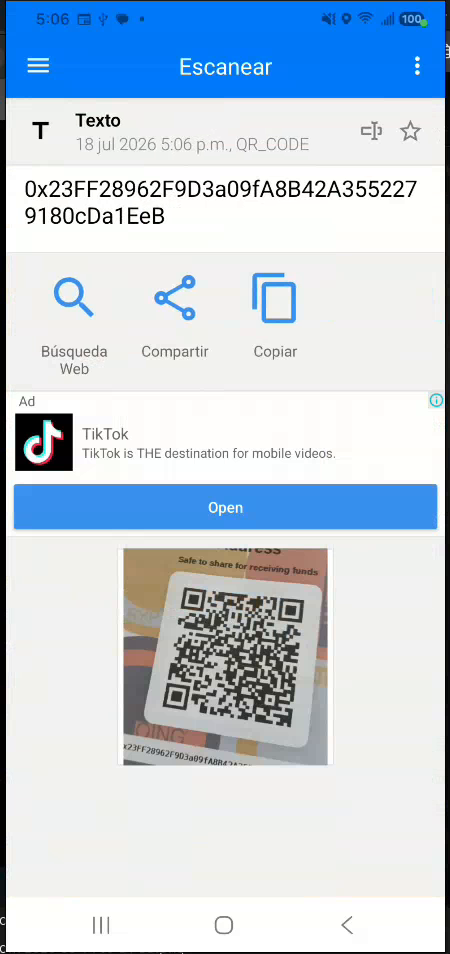
Scan only the Address QR.

The demonstration begins with the QR marked Address. This is the public receiving address—not the private key QR.

Press thisUse a QR reader, or Rabby’s address scanner, and point it only at the Address square.

What should happenThe phone reads a long address beginning with 0x.

Stop ifthe paper section says Private Key, Secret, Mnemonic, or Recovery Words.
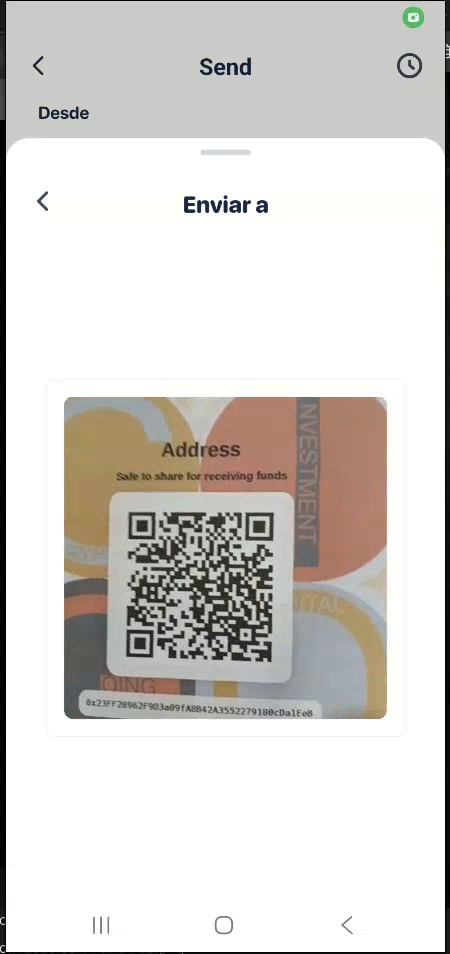
Phone scanning the public Address QR on the retired training paper wallet
The pictured QR is the public address of the retired demonstration wallet. Do not send funds to it.
3

Copy the public address.

The scanner displays the public address as ordinary text. Public means anyone may look it up; it does not allow spending.

Press thisTap Copiar, which means Copy.

What should happenThe address is placed on the phone’s clipboard so it can be pasted into BscScan.

Stop ifthe scanned text does not begin with 0x, or the first and last characters do not match the printed Address.

QR reader showing a copied public wallet address
Only a public address is copied. Never copy a private key into a browser.
4

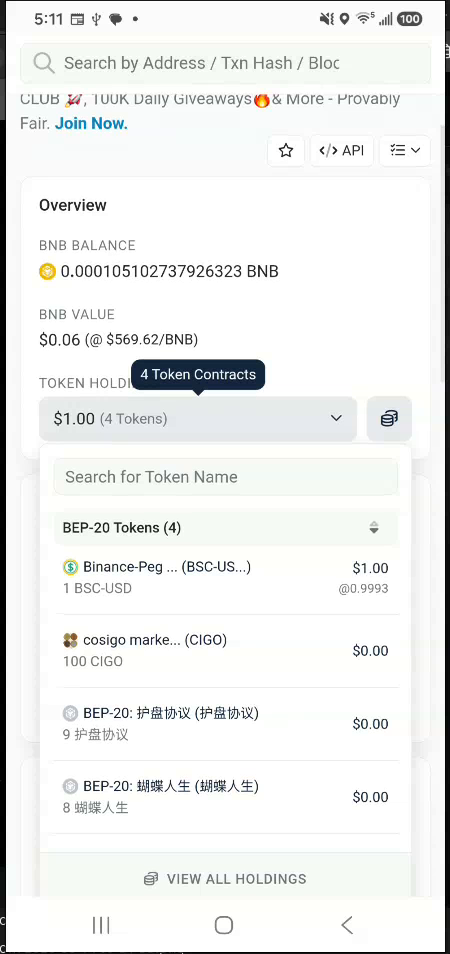
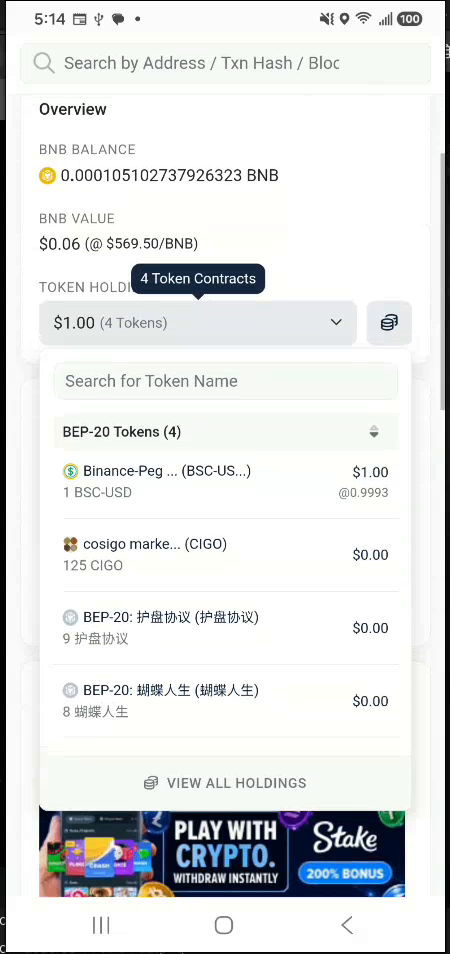
Verify the balances on BscScan.

BscScan is a public search page for BNB Smart Chain. It can show an address and its balances without connecting Rabby or asking for a signature.

Press thisOpen BscScan, paste the public address into the search box, and open the matching Address result. Expand Token Holdings.

What should happenYou see the BNB balance and token list. This demonstration initially showed 100 CIGO, 1 USDT, and a small amount of BNB.

Stop ifany site asks for the private key. BscScan needs only the public address for this check.

BscScan token holdings showing 100 CIGO, one USDT, and a small BNB balance
Public verification before import: 100 CIGO, 1 USDT, and BNB for network processing fees.
Optional

Prove the address with a small public transfer.

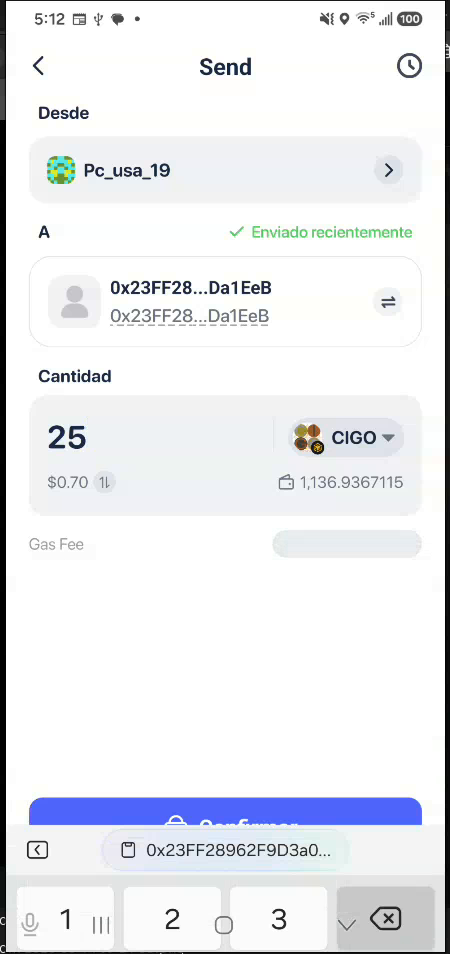
This is not required for importing. During the demonstration, a different wallet sent 25 CIGO to the paper wallet’s public address. No secret was needed to receive it.

Safer beginner ruleSkip this step unless you already know how to send CIGO. Never test with an amount you cannot afford to lose.

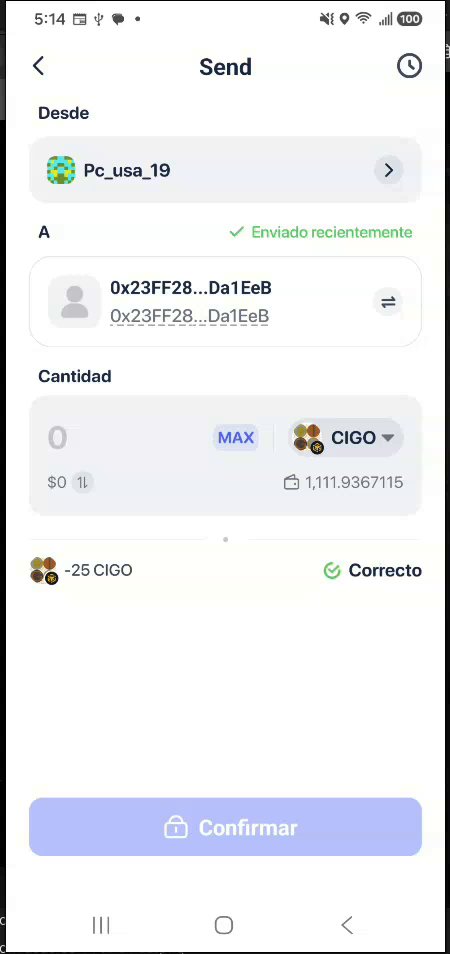
What happened hereRabby showed Correcto, meaning the 25 CIGO send completed. BscScan then changed from 100 to 125 CIGO.

Rabby prepared to send 25 CIGO to the retired training address
Optional test: 25 CIGO addressed to the public wallet address.
Rabby showing a completed 25 CIGO transfer
Correcto confirms the transfer completed.
BscScan token holdings showing the increased 125 CIGO balance
BscScan independently shows the new 125 CIGO balance.
5

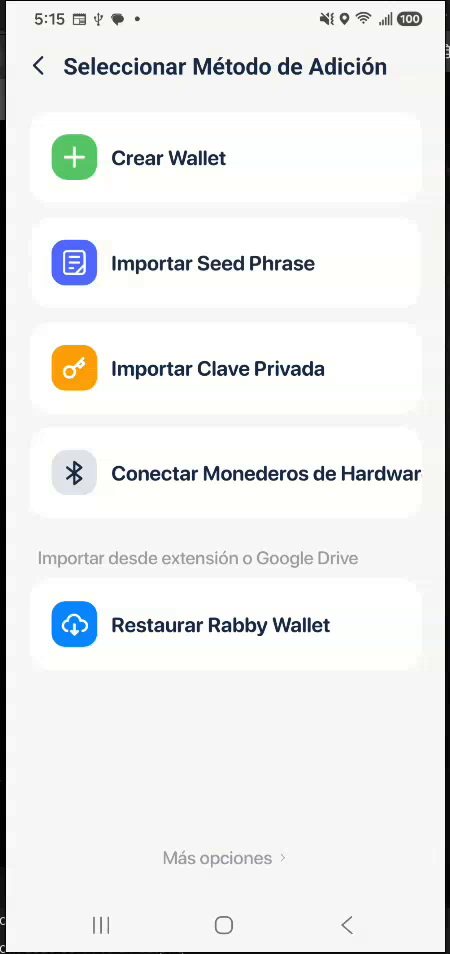
Open Rabby’s Add Wallet menu.

Rabby is the wallet app. Importing gives Rabby control of the existing paper-wallet address; it does not create a network transfer.

Press thisIn Rabby, open the wallet list. Scroll to the bottom, press Añadir una Wallet (Add Wallet), then press Importar Clave Privada (Import Private Key).

What should happenRabby opens its private-key import screen.

Stop ifyou downloaded Rabby from a message, advertisement, or unknown site. Start at rabby.io.

Rabby Add Method page with Import Private Key highlighted by its orange key icon
Choose Importar Clave Privada. The Seed Phrase option is a different import method.
6

Enter the private key where nobody can see it.

The private key is the control secret for this address. Type it or scan its private QR only inside the official Rabby app.

Before continuingTurn off screen recording. Cover nearby cameras. Make sure nobody can see the screen or paper. Do not save the key to the clipboard, cloud photo backup, email, notes, or chat.

What should happenRabby accepts the key and asks for the app’s normal local confirmation.

Stop ifthe private key has already been photographed, recorded, uploaded, or seen by another person. Treat that wallet as compromised and move its funds to a fresh wallet.

7

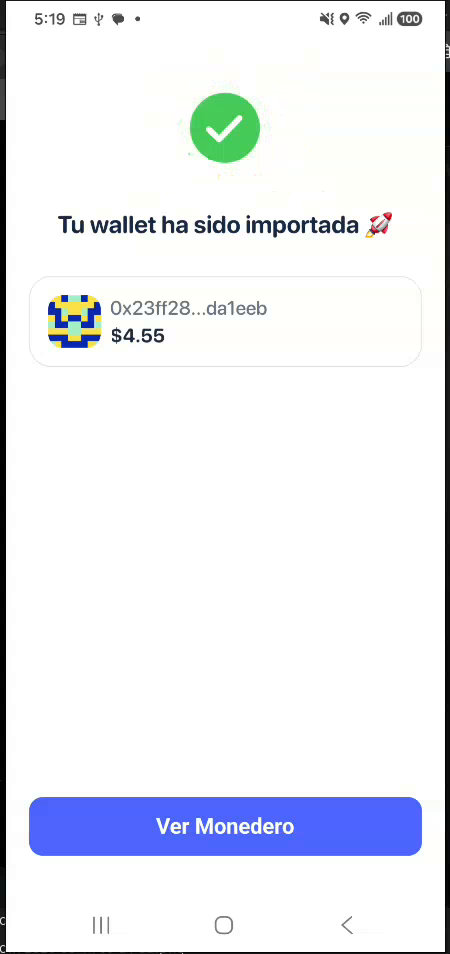
Confirm the imported address.

Rabby abbreviates long addresses. Compare the visible beginning and ending with the paper’s public Address and the BscScan result.

Press thisTap Ver Monedero, which means View Wallet.

What should happenThe address begins with 0x23ff28 and ends with da1eeb in this retired training example.

Stop ifthe first or last characters differ. Do not send anything until the mismatch is understood.

Rabby confirming that the retired training wallet was imported
Successful import. The shortened public address matches the verified training address.
8

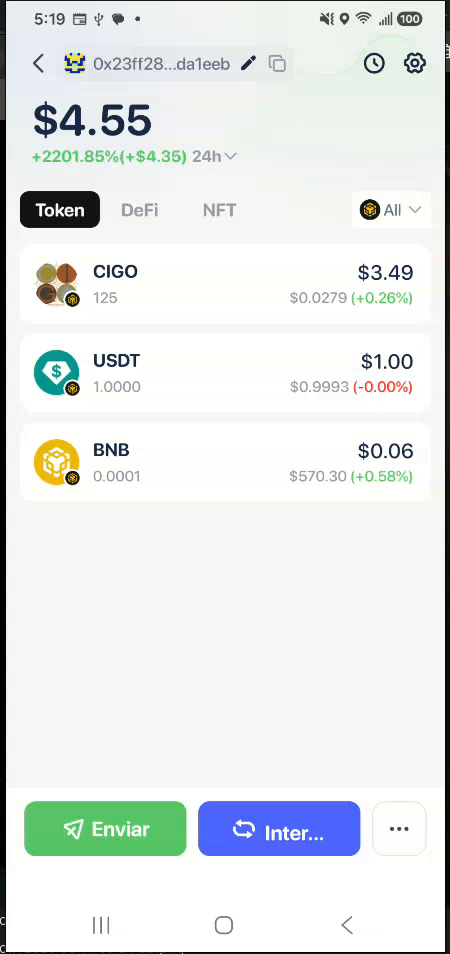
Compare the balances.

Rabby should now show the same assets that BscScan showed. Small dollar estimates may change with market prices; compare the token quantities.

Check theseThe demonstration shows 125 CIGO, 1 USDT, and 0.0001 BNB.

What this provesThe imported private key controls the same public address checked on BscScan.

Stop ifthe address matches but assets are missing. Confirm Rabby is displaying BNB Smart Chain and refresh before taking any action.

Imported Rabby wallet showing 125 CIGO, one USDT, and a small BNB balance
The wallet’s token quantities match the public record.

End of the demonstration

This training wallet was permanently retired.

The retirement shown here is proof about this demonstration—not a step every user must perform. This wallet’s secret was exposed while creating training material, so it can never be trusted again.

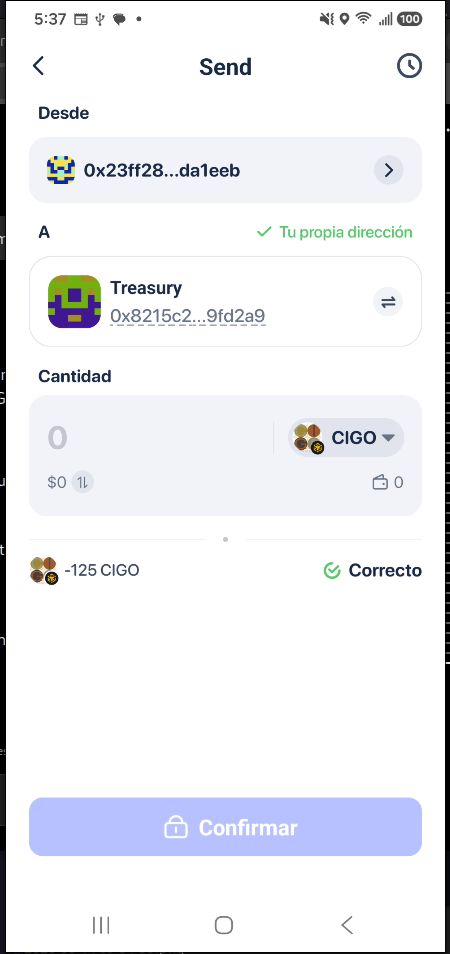
Rabby showing that all 125 training CIGO was returned to COSIGO Treasury
All 125 training CIGO was returned to COSIGO Treasury for safety.

What was removed

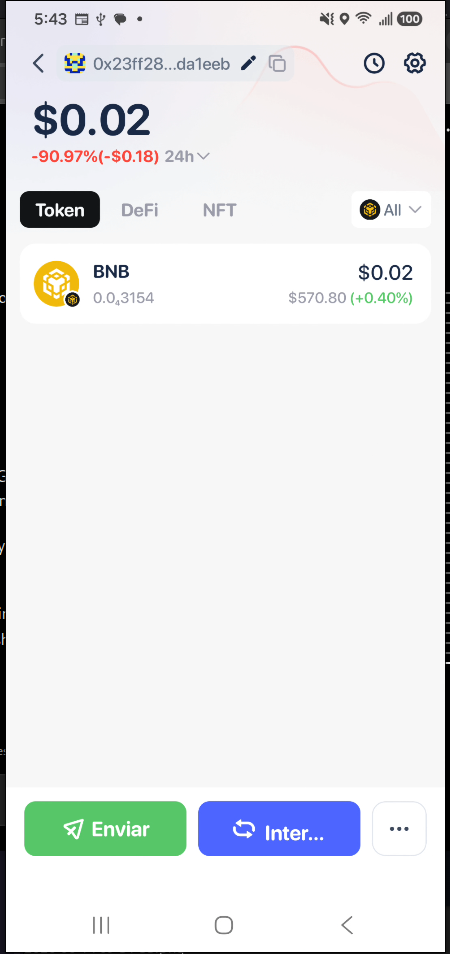
All CIGO and USDT were removed. Only approximately $0.02 of unusable BNB processing-fee dust remained.

Do not send assets to the address shown in this guide. It will never be used again.

BNB dust means a tiny remainder too small to move economically because the network processing fee would consume as much or more.

Retired training wallet containing only approximately two cents of BNB dust
Final retired state: approximately $0.02 of BNB dust and no CIGO or USDT.

Important change after import

The paper wallet is no longer offline.

Once its private key is inside a phone wallet, treat it as a phone wallet. Keep Rabby locked, keep the paper secret, and never reuse this address if the secret may have been exposed.